Toucan Keyboard First Impressions
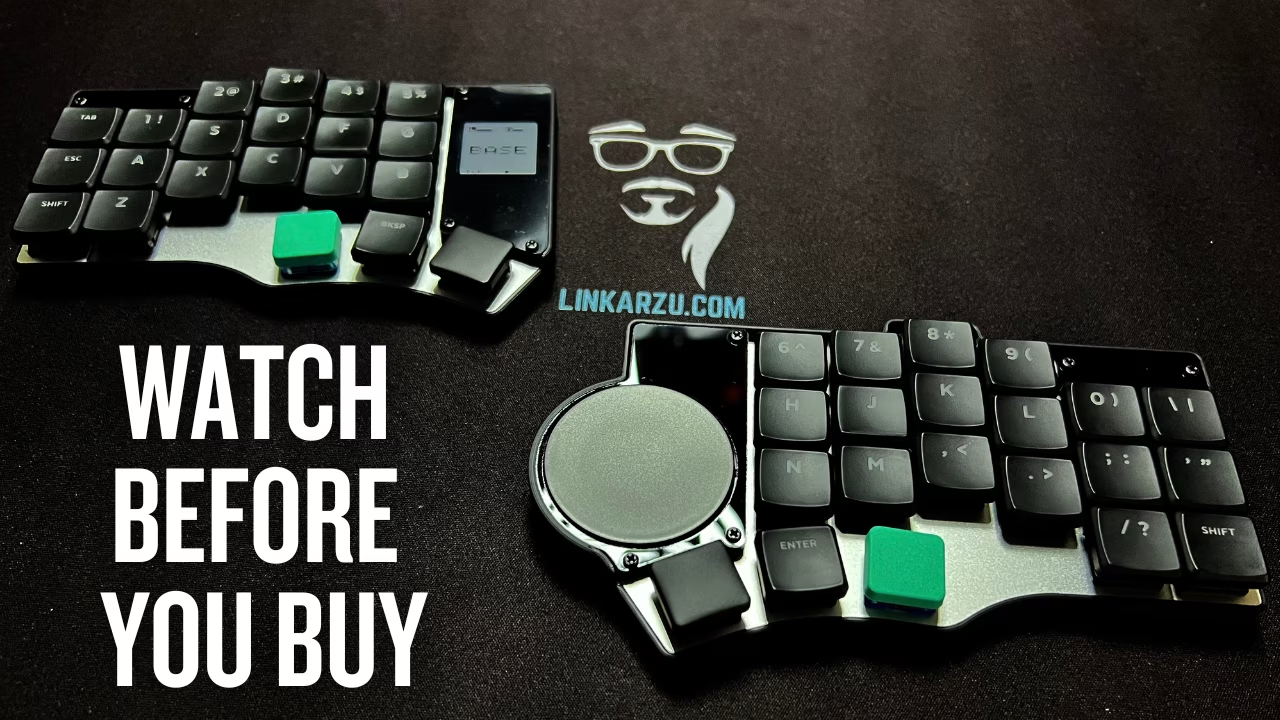
I’ve been daily driving the Glove80 for 1 year and 4 months, and I finally did the thing I kept telling myself I didn’t need to do. I bought a flat split keyboard. This is the Toucan by beekeeb, and the whole point of this video is simple. I have a theory about concave boards, hand position, and fatigue, and I want to test it with something that keeps my hands on the desk while still staying split.
Contents
Table of contents
- YouTube video
- Toucan keyboard first impressions
- Community-driven promotion
- You’re a fraud, why do you ask for money, isn’t YouTube Ads enough?
YouTube video
Toucan keyboard first impressions
Why did I get this keyboard?
Let’s take a look at this new keyboard I just got. It’s called the toucan by beekeeb
I’ve been using the glove80 daily for 1 year and 4 months
I bought it because concavity made sense, and YouTubers sold this keyboard like the best thing in the world out there, so I was convinced and fell for it.
But after using it daily for a long time, I encountered issues, but I have no way of knowing if they’re real issues until I try a flat keyboard.
While I’m saying all this, you’ll be able to see a close-up look of the keyboard
The glove80, due to its concavity makes your hands rest at a higher position from your desk, which raises them and I think that it made my fingers hurt. Even when using the palm rests.
I was using hard switches at the time, Plum Blossoms, which are 45gf. Moved to softer switches on the glove80, Cherry Blossoms (30gf), and that solved most of the problem.
But the idea kept wondering in my mind, concavity feels good and comfortable, but raising your hands from the desk surface makes them go in an unnatural position and there’s some tension. Your hands cannot just rest on the desk.
Yes, there’s solutions for that, like mounting them to your chair. I don’t use a chair with arm rests so that idea is out the window. Plus I really don’t go down that complicated cumbersome path.
What if we over engineer things to a point that they defeat their purpose?
I constantly remember how good it felt to type on my apple’s magic keyboard, so comfortable and smooth because it’s flat and my hands rest on the desk and just my fingers move. The problem is that it’s not split, and that caused major forearm pain for me, so I had to give up on conventional keyboards.
So I need to prove my theory, and for that I need a keyboard that is flat but also split.
There’s many options out there, I even ordered a corne min prototype that was supposed to be delivered months ago, but the MechboardsUK folks have not even decided on the switches yet, not sure when that is coming, or if coming at all
Someone in discord shared this toucan keyboard, and what caught my attention is the trackpad it comes with, so I purchased it.
I’ll compare it to the corne min prototype when I get it.
Is this a paid and biased review?
I purchased the keyboard, switches, key caps, and rest of the stuff with my own money and paid the full price
Beekeeb was kind enough to send a few extra gifts, like a set of switches and key caps and the Prospector USB dongle
These gifts however, will not affect my review of the keyboard. They have no idea what this video is about, and the opinions are 100% mine.
If there’s something I don’t like about the keyboard I’ll make sure to let you know.
I asked beekeeb if they could provide a discount code for my viewers, and they were kind enough to do so, use the code ARZU to get 5% off in both DIY kit / Pre-soldered Toucan keyboard.
I’ll leave the code in the video description.
Just FYI, I don’t get any money out of this deal. This is just to help you with shipping cost in case you decide to get one
First impressions
I love how flat the keyboard is (if you use it wirelessly). My hands can finally rest again on the desk
If coming from a glove80 it gets a few hours to get used to, as my fingers are so used to the glove80 key placement. Around 4 hours in and I’m already typing this blogpost in the new keyboard. So far it’s good, we’ll see how it continues.
Switches are soft, silent, and comfortable, more details on the switches later on.
The trackpad has been great so far, I can easily move the cursor around without lifting my hand from the keyboard
I can also scroll (inverted Y axis scrolling like a true macOS gigachad) and click on things. The trackpad is not as great as the trackpad on a MacBook computer, but it’s similar than the trackpad on my work laptop, which is a Thinkpad L15 Gen 4 type 21H8, AMD ryzen 5 PRO 7530U, 32GB of RAM. So if you’re used to normal crappy trackpads, I think you’ll be good.
The size of the keyboard makes it a great option if you want to take it with you, unlike the glove80 which is really bulky
The small screen is really useful to see battery levels and which Bluetooth profile is active. I’ll be using this keyboard both in my MacBook and with my windows work computer. On this part of the video I demo how the screen looks and works
Now, let’s see the trackpad in action
- Move cursor around
- Scroll up and down (inverted as in macOS, will show how to set it up later)
- Scroll left and right
- Click, double click
- Select multiple files
- Drag
- Right click (will show how to set this up later)
- Middle click (will show how to set this up later)
Typing test
Will be typing a song appropriate, and that matches the name of this keyboard: El tucanazo by Los Tucanes de Tijuana
Website
I’ll leave these links in the video description
Here’s the blogpost article for the toucan beekeeb.com/toucan-keyboard/
All the instructions and documentation for the keyboard can be found here docs.beekeeb.com/toucan-keyboard
More articles related to the toucan
This is the first video (blogpost) related to the keyboard, I’ll be posting other ones in which I’ll show:
- Toucan Keyboard, Build and Flash Custom Firmware
- Battery information (very important, as it’s not great as of Jan 2025)
- What’s in the box
- Switch typing sound test
- And more
Community-driven promotion
Do you want to promote yourself in my channel? I’m not talking about a company like notion, brilliant, and all those other ones we’re using to seeing. I’m talking about you as a person, do you have a project, course, youtube channel or product and trying to reach an audience?
If interested, pricing and all the details can be found in this other page
You’re a fraud, why do you ask for money, isn’t YouTube Ads enough?
- I explain all of this in the “about me page” link below:
- youre-a-fraud-why-do-you-ask-for-money-isnt-youtube-ads-enough
- Above you’ll also find links to my discord, social media, etc